
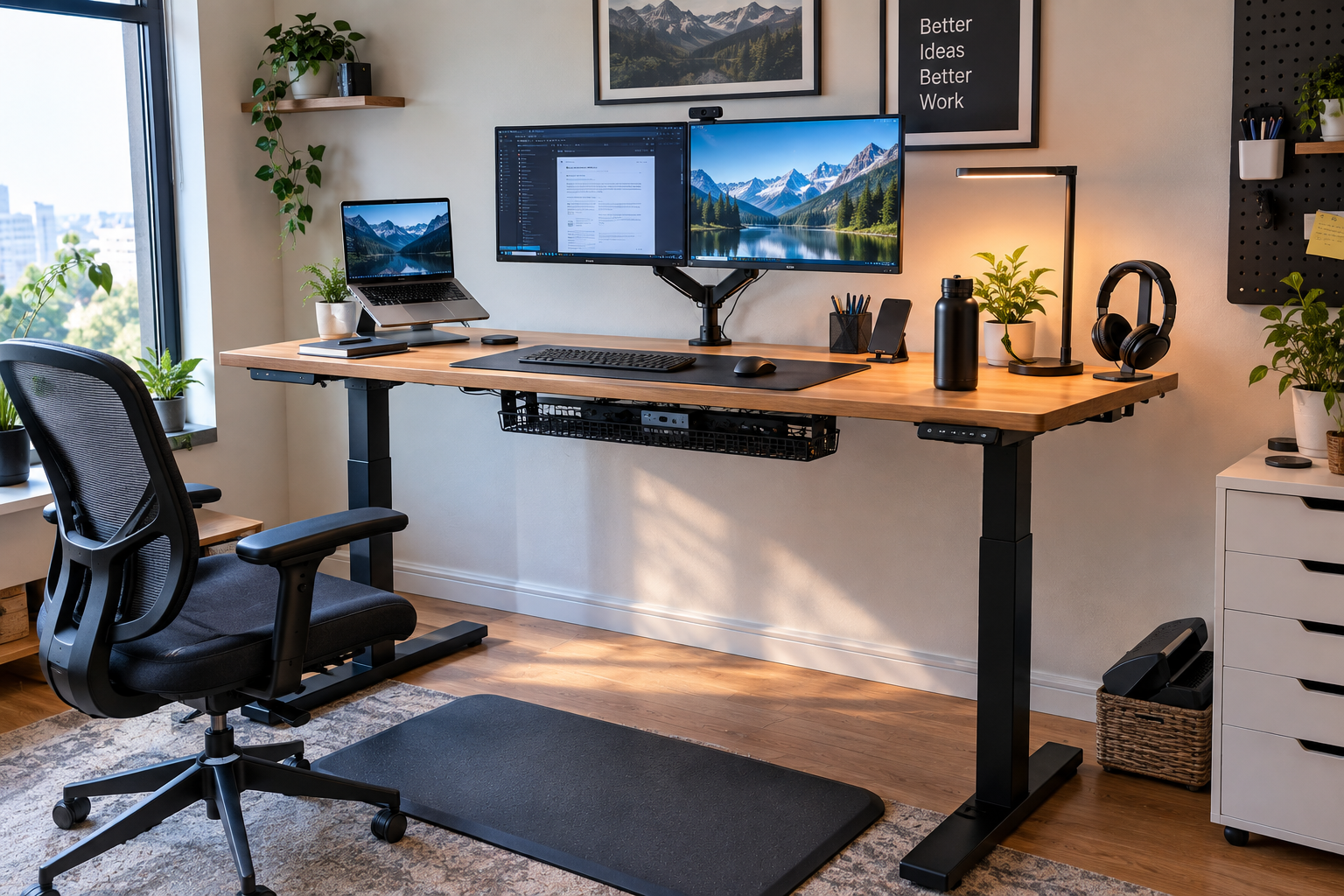
Buying a standing desk is just the starting point. A solid standing desk workspace combines desks, monitors, keyboards, lighting, cables, and some important accessories, all designed to support the right posture, rather than being a factor in losing your posture. Even if the setup looks great on Instagram, if the elements are not working together, there is a possibility that the neck will become stiff and the shoulders will rise too much. Years of experience in validating numerous standing desk setups have taught us that comfort and functionality are far more important than appearance. In this guide, you’ll learn practical ways to build a truly comfortable workspace for everyday use.
What Makes a Good Standing Desk Workspace?
Owning a height-adjustable desk is a very different story than building a functional workspace. A desk gives you the option to work from the ground up, but whether that option is helpful or counterproductive depends on your other settings.
Putting Comfort Before Appearance
Too many people are too focused on a clean, minimal look to have a monitor that is too low or that forces them to reach for the keyboard. Posture and positioning are top priorities. A neutral posture, which relieves the shoulders, brings the elbows close to 90 degrees, and keeps the head balanced, reduces the strain on the neck, shoulders, and hips. The Occupational Safety and Health Administration’s Computer Workplace Guidelines (OSHA) also emphasize this point. In other words, keep your unnatural posture to a minimum.
Make Everything Work Together
Desks, monitors, keyboards and mice, chairs, lighting, and some simple accessories – everything should complement each other. When you change one height, you usually need to fine-tune the other parts as well. In actual use, a long-lasting setup is one in which these elements work together as a system.
Start With the Right Standing Desk
Before deciding on the location of the monitor or cable, first make sure that the desk itself is suitable for the application.
Choose a Useful Desktop Size
A 48-inch tabletop can be set up with a single monitor. Dual monitors typically require more depth and width to center the screen and provide room for keyboard and mouse movement. The experience is that desks that are too big can become cluttered and difficult to manage cables. Make sure you have enough space in front of you to stretch your arms naturally.
Check Stability at Standing Height
The higher the desk, the more noticeable the wobble will be. Large monitors and dual monitors further amplify the shaking from side to side and back and forth. In my tests, even a desk that was stable when sitting could shake during standing work. This hinders focus and reduces motivation to use.
Make Sure the Height Range Fits You
The desk needs to be adjusted to the height of the elbows in both sitting and standing conditions. Avoid copying other people’s settings. More than any chart, the proportions of your body are important. The appropriate adjustment range is usually about 25 to 50 inches (25 to 50 inches), allowing most people to remain neutral in either position.
Set the Correct Monitor and Keyboard Position
This is the section that makes or breaks most workspaces.
Position the Monitor at a Comfortable Height
If the screen position is too low, you will inevitably have to lower your head, especially when you are standing. The top of the monitor should be at or slightly below eye level, and should be placed about the length of your extended arm. The Occupational Safety and Health Administration (OSHA) recommends at least 20 inches. The monitor arm allows for quick adjustment when changing the height. I have seen many people leave the monitor on the original stand and are puzzled by the reason why their neck gets stiff when they stand for about an hour.
Keyboard and Mouse Put Close
Reaching forward makes it easier to raise the shoulders. The devices should be placed close enough so that the elbows are close to the side of the body and the wrist remains in its natural position. The keyboard should be placed at about elbow level so that the forearm is parallel to the floor. This is consistent with the Neutral Posture guidelines from sources such as the Canadian Center for Occupational Safety and Health (CCOHS).
Consider a Laptop Stand
If you work mainly on a laptop, the stand will raise the screen and allow you to keep your hands at the right height with an external keyboard and mouse. This eliminates the need to choose between visual and typing comfort.
Organize Cables for a Height-Adjustable Desk
Leave Enough Cable Slack
Check all cables at both the lowest and highest points of the desk. If the cable is stuck, the port will be pulled, or the device will be pulled out as the desk rises. I myself made this mistake in the early days, and I saw the power cord come off during a meeting.
Working With Cable Trays
Install a tray under your desk to store power taps and extra cables. This allows you to clean up under the desk without creating new entanglements. Simple adhesive clips or basic cable channels under the desk are sufficient.
Add Accessories That Actually Improve the Workspace
Skip the gadgets that look useful and stick to ones that solve real problems.
Fatigue Reduction Mat
If you are standing for a long time, a good mat will ease the burden on your feet and encourage you to gradually move your weight. Studies on long standing work have shown that using mats and similar measures can reduce fatigue in the lower legs and feet.
Monitor Arm
This allows for more desk space and allows users to fine-tune the height and depth in seconds when switching between sitting and standing.
Headphone Holder and Small Desk Accessories
A simple hook or small tray for frequently used items can help keep your desk clean. Add only those things that don’t interfere with your work. What is superfluous is unlikely to improve ergonomic comfort.
Don’t Forget the Sitting Position
Use the Desk for Both Sitting and Standing
Standing all day can cause leg fatigue, strain on the joints, and poor circulation. According to the CCOHS, recommendations vary, but one consistent advocacy is to alternate attitudes. Many people switch positions every 30 to 60 minutes or sit for 20 minutes, then do a short standing task and then take a shorter break. If your desk has a preset height setting, save each one. You might like to read an article on the topic, How long to stand at a standing desk.
Choose the Right Chair
Even when the desk is lowered, the chair should function properly. Make sure you can keep your monitor and keyboard in the same neutral position even when you’re sitting. Feet should be placed flat on the floor or on a footrest, and chairs should be tightly supporting the hips.
Improve Lighting and Workspace Placement
Reduce Monitor Glare
Adjust your desk position so that the direct sunlight from the window does not hit the screen. Side-lighting and blinds can often be quicker to solve than expensive descramps.
Give the Desk Enough Room
Make sure you have enough space behind and on both sides to raise and lower your desk freely. Also check the location of the outlet and the surrounding furniture. If the work space is too small, you will quickly feel stress when adjusting the height frequently.
Common Standing Desk Workspace Mistakes to Avoid
- Standing all day. Change your posture or take a short break to move your body.
- The height of the desk is too high. Symptoms such as lifting the shoulder or bending the wrist develop quickly.
- The monitor position is too low. It is especially noticeable when standing.
- Ignore the movement of the cable. The cable must be able to travel the entire height range without difficulty.
- Buying too many accessories. The increase in equipment does not necessarily mean that it is better ergonomically.
My Simple Standing Desk Workspace Setup
After years of trial and error and adjustment, the most effective in my experience are:
- High-stability electric height control desk with a practical top size
- Arm-mount one or two monitors with a tabletop positioned at eye level or slightly below
- A comfortable keyboard and mouse at hand
- A chair that is less tiring from sitting for long periods of time
- Simple cable tray for under-desk use and ample cable space
- Fatigue-Reducing Mat for Standing Work
- Soft, glare-free lighting
- Only the accessories that you actually use every day
After a few days of using the setup, I always make tweaks. Most of the time, you’ll just change the height of the monitor a little, or move your mouse a few inches forward. These small changes make more of a difference than any single product.
Final Words on Standing Desk Workspace
An ergonomic standing desk is just one of the components of an ideal workspace. Focus on comfort, ease of adjustment, and simple organization rather than staying up all day. Adjust everything to your height and habits. What is best for your co-workers doesn’t always fit you. Create a standing desk workspace where you can switch positions freely, stay neutral, and stay productive without being bothered by the environment. This is the approach that has worked best for me for many years.

Aamir Riaz is the founder and owner of Bashufy. After years of working with uncomfortable desks and learning the importance of better posture, he shares honest standing desk reviews, buying guides, and ergonomic tips based on research and real user experiences to help readers make better choices for their home office setup.