
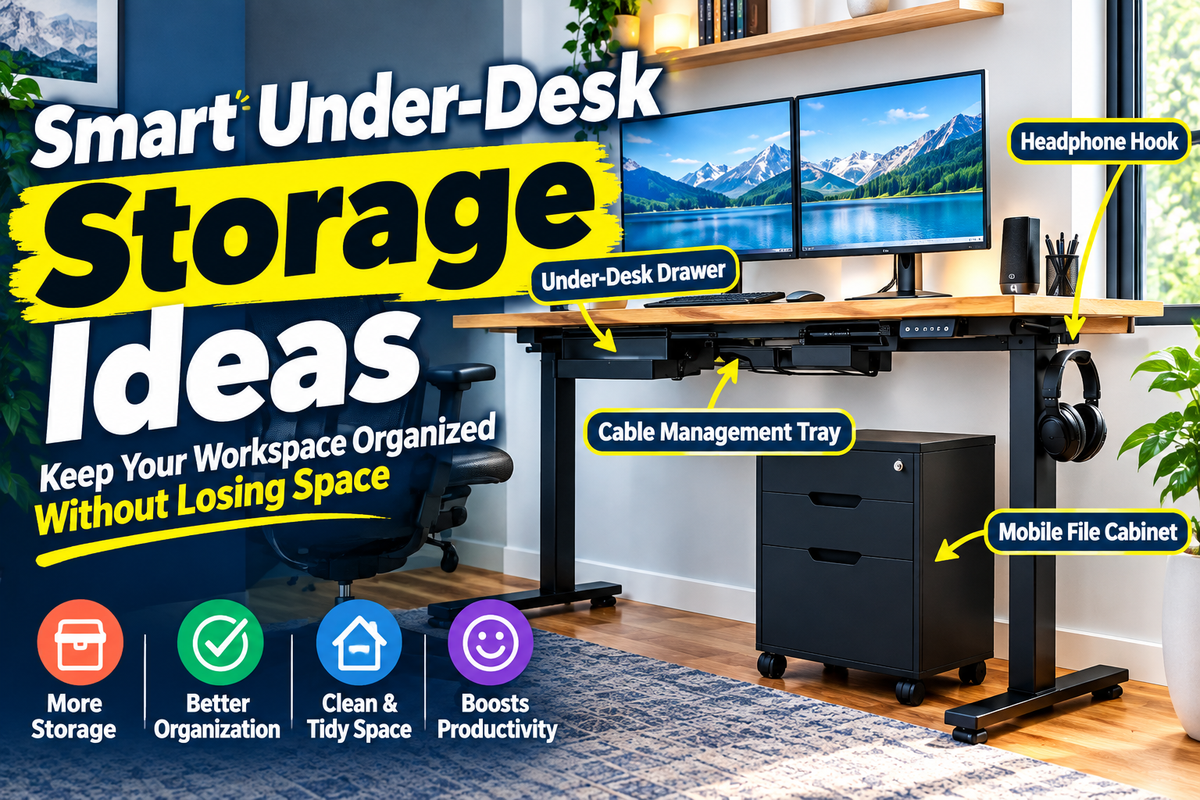
When I switched to a standing desk for the first time, I felt that the free space under the desk was a big advantage. The heavy drawers did not hit the knees, and the posture was not limited by the fixed cabinet. But then the charger, the notebook, the spare cable, and the home office began to clutter with a growing number of miscellaneous things. After years of testing dozens of different standing desk setups, I learned that storage under the desk only works if you respect the most important thing: you need space to move your feet and legs.
Here is a practical guide that I wanted to know earlier based on real-world testing, everyday use and proven ergonomic principles.
What is the Best Desk Storage for Standing Desks?
The best stand-up storage for a standing desk is the one that goes up and down with the top plate, or the one that doesn’t interfere with the lifting mechanism such as the knees and thighs. In my experience, a combination of slim wall drawers for daily necessities, a cable tray, and a low-profile caster cabinet on the side will ensure the most efficient space without interfering with the sitting movement. Anything that blocks the movement of the feet or forces you to shift your sitting position back will ruin the original purpose of this desk.
- Add Desk Drawers for Small Items
Slim desk drawers to attach under the tabletop are one of the cleanest solutions I have found. Your desk moves with you, so your pens, sticky notes, USB drives, spare mice, and small adapters stay exactly where you expect them to be, whether you’re sitting or standing.
As a result of trial use, the drawer with a height of about 2-3 inches or less in a closed state was the most convenient. Anything deeper than that would now hit the arms and thighs of the chair. Choose a smooth ball-bearing slide mechanism and a slim design. One thing I noticed is that some people end up cramming too much into these drawers, and eventually they can’t open them. Use it to store items that you pick up many times a day.
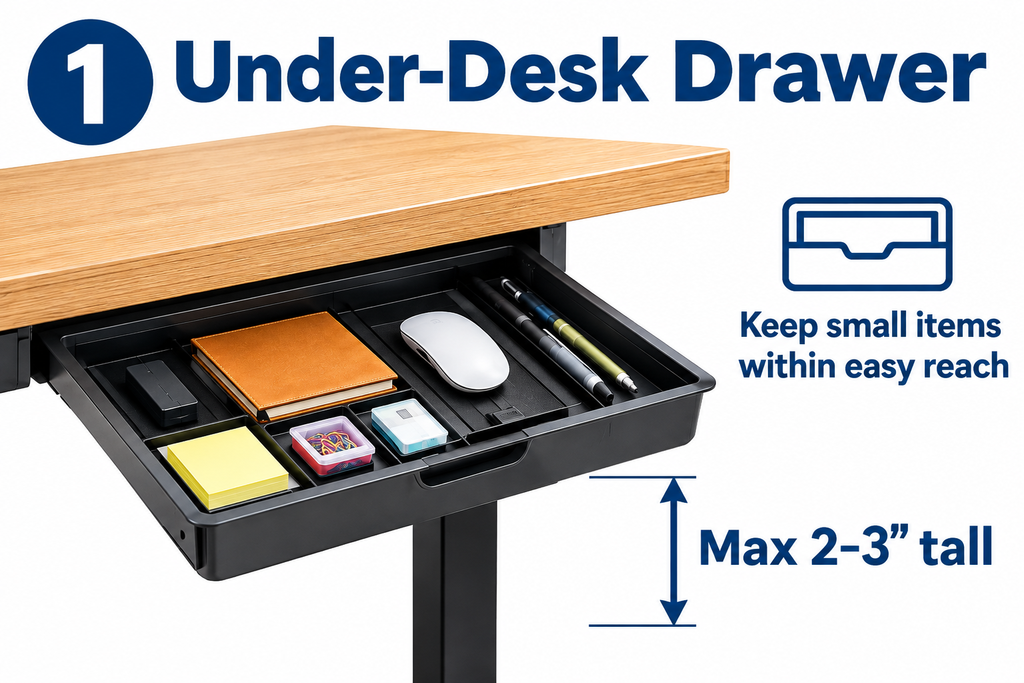
Measure the space between your desk legs and the middle crossbar or motor housing before you purchase. For some frames, the drawer is slightly shifted from the center so that it does not interfere with hardware.
- Use an Under-Desk Cable Tray as Storage
Cables are the ones who unknowingly take up space under standing desks. A cable tray or adhesive cable duct under the desk can be used to turn the mess into a tidy storage space. Install the power tap inside the tray, wind up the extra cord, and keep the power adapter and charger away from your feet, without placing them on the floor.
First, I found that wiring all the cables at the highest point of the desk provides ample room for the entire desk up and down range. If you can’t afford it, a short cable can pull your monitor or laptop when your desk rises. The cable tray and the excellent keyboard tray combine to keep your desktop tidy and the bottom side tidy.
If you’re looking for a keyboard tray, check out my Best Keyboard Trays for Standing Desks guide. Details of the height and slope that go well with storage under the desk are explained.
- Try an Under-Desk Headphone Hook
Simply attach a simple clamp or screw-on headphone hook to the front or side edge of your desk to make your day-to-day use much easier. It prevents headphones from splashing on the desk or on the floor. In practice, this is one of the easiest ways I recommend to friends who throw their headset onto paper or keyboard.
Choose a hook that doesn’t hang so low that you can crush your shin when you sit down. The best option is to place it close to the edge of your desk.
- Put a Rolling Storage Cabinet Beside the Desk
When storing documents, printer paper, spare laptops, or large amounts of equipment, it is usually wiser to use a shorter caster cabinet or movable pedestal rather than trying to pack everything under the desk. These will remain on the floor when you move your desk. You can pull it out when you need it, and store it under your desk when you are sitting.
In most home office layouts I have seen, a 2- or 3-drawer cabinet less than about 24 to 25 inches tall will fit comfortably under a typical sitting desk height. The cabinet should be placed on one side so that the knee space is not blocked. This side-to-side arrangement was the most significant difference for me.
- Use a Small Under-Desk Shelf Carefully
If you have a shallow hanging shelf or storage space near the front or side edge, you can place a notebook, a mobile phone, a small docking station, etc. The important thing is to be shallow. Anything that protrudes more than a few inches into the space at your feet will quickly get in the way when sitting.
After a few actual trials, we found that it was most effective when you put items that are lightweight and frequently picked up rather than heavy files or piles of books. If the shelf even a little interferes with the thighs, it is better to refrain from installing it.
- Arrange Your Desk for Better Accessibility
After spending countless hours researching ergonomics and observing how people actually work, we found that the most effective way to store is to classify items according to their frequency of use. The simplest system that worked best for me was:
Things I Use Everyday
Pen, sticky notes, USB memory, spare mouse, phone charger, noise canceling headphones. These are stored in a slim drawer under the desk or in a shallow hanging shelf, so that they can be reached with one movement, whether you are sitting or standing.
Things I Use Every Week
Notes, spare cables, backup hard drives, small notepads. These can be stored in the top drawer of the caster-equipped cabinet placed on the side. Ideally, it should be close enough to make pulling out the cabinet a hassle, but not cluttering up the main work space.
Things I Rarely Use
Archive files, spare power supplies, seasonal supplies, and tons of paper. These can be stored in a nearby bookshelf, closet, or deep cabinet away from your desk. If you put it under your desk, it will only create a visual and physical clutter that you don’t need at all during work.
This frequency-based approach is the same principle I apply when building a workspace dedicated to standing desks. The goal is to reduce the number of times you reach out and minimize the visual noise on the main work surface.
- Don’t Block Your Legs With Storage
The Occupational Safety and Health Administration’s (OSHA) Computer Workstation Guidelines clearly address this point. This means avoiding CPUs and other items under your desk and minimizing the space you need for your legs and feet. Clearance under the work surface should generally ensure a height of 20-28 inches. The recommended depth for most users is about 17 inches at the knees and about 24 inches at the feet.
My tests showed that once the storage began to enter its central zone, users tended to sit deep into the chair, roll their shoulders, and constantly adjust their position to avoid contact. This slight restriction ruins many of the comfort that a standing desk should provide. Make sure that the main space for moving the legs is completely free.
- Be Careful With Storage on the Moving Desktop
Anything mounted on the bottom of a height-adjustable desk must operate safely over the entire height range. Too heavy or poorly balanced storage items can strain the motor or cause wobbling at the height of standing work. I’ve actually seen one installation where a hanging file box full of luggage can cause a loss of stability when the desk is fully lifted.
Choose lightweight, well-fitted storage products. Storage items that feel constantly adjusted every time they change their height are not suitable for standing desks.
- Use the Wall or Nearby Furniture for Larger Storage
Wall-mounted shelves, pegboards, or nearby bookshelves can reduce the burden of space under your desk. Large items such as printers, reference binders, and spare monitors should be stored in wall and side spaces rather than scrambling for limited space under the desk. This method is especially useful in narrow rooms.
The Best Standing Desk for Tight Spaces In this article, I’m going to show you how the use of a compact frame can help you make better use of the storage space on the sides and walls.
- Leave the Middle of Your Desk Clutter-Free
The center space just below the typing position is not a storage space, but a space for straightening your posture. One of the trends I have noticed over the years is that in the most tidy and comfortable desk environment, this central zone is treated as a no-go. Storage can be located on the side, at the back end, or in a movable unit that can be pulled out unobtrusively.
By following this one rule, you will not only be able to sit close enough to maintain the correct posture, but also be able to stand with no obstacles at your feet. It also makes it easy to add a fatigue-reducing mat and reposition when standing for long periods of time.[ Read More ]
How I Would Organize the Space Underneath a Standing Desk
If I were to set up a standing desk today, the layout I would adopt would be exactly the following:
- A slim drawer slightly shifted from the center under the desk for storing everyday accessories
- Cable tray along the bottom of the back with power strips inside
- Headphone hook in front corner
- Horizontal cabinet with low casters for weekly and bulky items
- Do not place anything on the middle knee or foot space
This combination frees up your desktop, gives you plenty of leg space, and puts everything you need within reach. And when combined with the right monitor height, all of your eyes, arms, and legs are in a comfortable range. For more information on setting up monitors, see my guide on ideal monitor heights for standing desks.
What I Would Avoid Under a Standing Desk
- Deep drawers and hanging file boxes that compress the space at the feet
- Fixed cabinets that force the user to sit back
- heavy storage furniture that moves with the desk and brings a noticeable weight or wobbly
- Items that interfere with lift columns or crossbars
- a pile of cables that are casually left on the floor where the feet need to be move
I myself made these mistakes a few times in my previous setup. The biggest loss of comfort has always been the loss of space at the feet.
My Simple Standing Desk Storage Setup
My desk now features a shallow drawer for everyday accessories, a cable tray on the back, headphone hooks on the sides, and a low-castered pedestal on the left. The middle part is empty. On the desktop, only the keyboard, mouse, monitor and a small notebook are placed. Everything else is stored in a place that does not interfere with sitting movements.
This layout has been consistently maintained throughout the years of daily use. This is because they always follow the same rule: storage is for the body, not the other way around. When building a more fulfilling home office with a limited budget, I will start with the principles below the desk and expand from there to the outside. My step-by-step guide on how to build a comfortable standing desk environment within your budget details the entire process.
Summary
Creating a storage space under your standing desk isn’t just about filling empty spaces. It’s important to make sure you have enough space to move your legs and a place where you can store items you use every day. After many years of experimenting with different combinations, a solution that can last a long time is one that can move with your desk or fit neatly in an unobstructed place.
Let’s start with securing space. Measure the minimum height when sitting, check the space of the knees and feet, and place only what you will hold every day. Other than that, store it on the wall, in the side cabinet, or in a more distant place. Thanks to this approach, my workspace has been easy to use and comfortable for many years. And I have the same advice for my friends who are just starting to use a standing desk.

Aamir Riaz is the founder and owner of Bashufy. After years of working with uncomfortable desks and learning the importance of better posture, he shares honest standing desk reviews, buying guides, and ergonomic tips based on research and real user experiences to help readers make better choices for their home office setup.